¿Necesita ayuda?
Ahora eres dueño de una parte de la red Bitcoin.
¡Disfruta del mundo
Bienvenido a
Minería de Bitcoin con BitAxe
Felicitaciones por recibir su
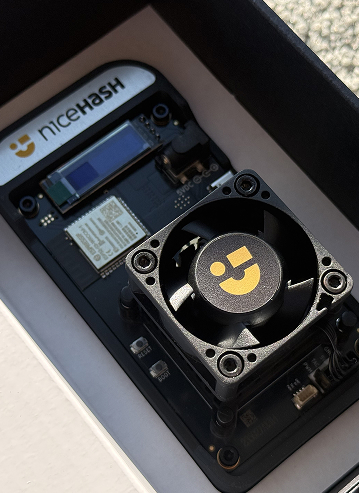
BitAxe Solo Miner
Ahora eres dueño de una parte de la red Bitcoin.
Este dispositivo te permite minar Bitcoin desde tu casa u oficina. Tienes dos maneras principales de usarlo:
Parte 1
Conecte Su Dispositivo
(Necesario)
Before choosing a mining mode, put your BitAxe online.
-
Power On:
- Plug in your BitAxe using the provided power supply.
-
Connect to the Device:
- On your phone or laptop, open your Wi-Fi settings.
- Look for a temporary network named Bitaxe_XXXX (the suffix is unique to your device). Connect to it.
-
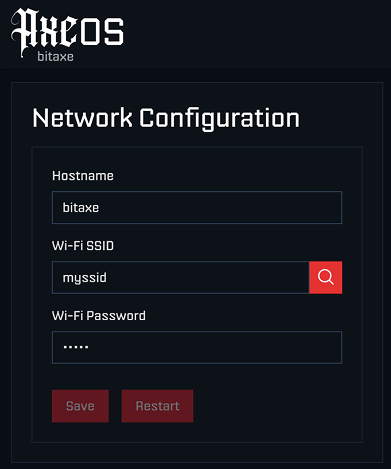
Configure Wi-Fi:
- A setup page should open automatically. (If not, type
192.168.4.1into your web browser). - Click the "Search Icon" and select available Wi-Fi networks.
- Crucial Step: Select your home/office Wi-Fi name (SSID) from the list.
- Enter Your Wi-Fi Password: Enter the password for your home/office internet connection.
- Click Save.
- Click Restart - The device must reboot before next step.
- A setup page should open automatically. (If not, type
-
Find Your IP:
- Look at the small screen on the BitAxe. It will verify the connection and display an IP Address (e.g.,
192.168.1.55).
- Look at the small screen on the BitAxe. It will verify the connection and display an IP Address (e.g.,
-
Access BitAxe Dashboard:
- Make sure your phone/computer is back on your regular Wi-Fi.
- Type that IP address into your web browser to access your BitAxe dashboard.
Parte 2
Elige Tu Estrategia
Option A: Steady Earnings (NiceHash)
Choose this option if you want guaranteed, small daily payments for your device's contribution.
-
Get Your Address:
- Log in to your NiceHash account and copy your Mining Address (found in the "Mining" tab).
-
Configure BitAxe:
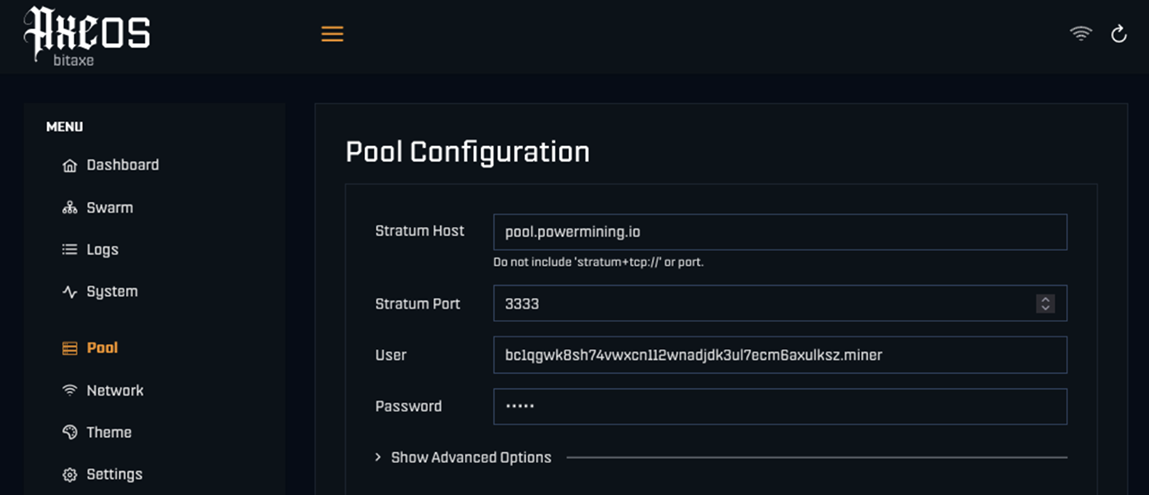
- In the BitAxe dashboard, go to the Pool tab.
- Stratum URL:
stratum+tcp://sha256asicboost.auto.nicehash.com:9200 - Stratum User:
YourMiningAddress.WorkerName - Example:
NHLp...7x.Bitaxe01 - Stratum Password:
x
-
Start:
- Click Save and Restart.
Option B: The "Lottery" (Solo Mining)
Choose this for the thrill. You will likely earn $0 on most days, but you are running a 24/7 attempt to find a Bitcoin block yourself and win the full reward (3.125 BTC or ~$300,000+ USD).
Recommended Pools:
-
PowerMining Pool
- Stratum URL:
stratum+tcp://pool.powermining.io - Stratum Port:
3333 - Stratum User:
YourBitcoinAddress - Important: Use a real Bitcoin wallet address (e.g., from your Ledger, Trezor, or Exchange).
- Stratum Password:
x
- Stratum URL:
-
Solo CKPool
- Stratum URL:
stratum+tcp://solo.ckpool.org - Stratum URL:
3333 - Stratum User:
YourBitcoinAddress - Stratum Password:
x
- Stratum URL:
To activate: Enter the details into the BitAxe "Pool" settings, then click Save and Restart.
Tip: You can monitor the pool-side performance by using your Bitcoin wallet address on PowerMining, CKpool website, or inside the NiceHash mining dashboard.
Parte 3
Manejo del Ruido y el Calor
Optimize the device for your environment in the Settings tab.
💡 PRO TIP: SILENT OFFICE MODE Want the device quiet enough for your office desk?
- Set Minimum Fan Speed to 10% or 5%.
- Set Frequency and Core Voltage to their minimum values.
Note: This slightly lowers mining speed, but makes the device nearly silent and very cool.
For Standard Tuning:
- To reduce noise: Lower the Frequency (e.g., 400 or 490).
- To maximize performance: Increase the Frequency (Warning: this increases fan noise).
- Fan Control: Ensure "Automatic Fan Control" is checked.
Always click Save and Restart to apply changes.
¡Disfruta del mundo
de la minería de criptomonedas!
Este sitio web utiliza cookies para garantizar que obtenga la mejor experiencia en nuestro sitio.